Account & Settings
My Profile
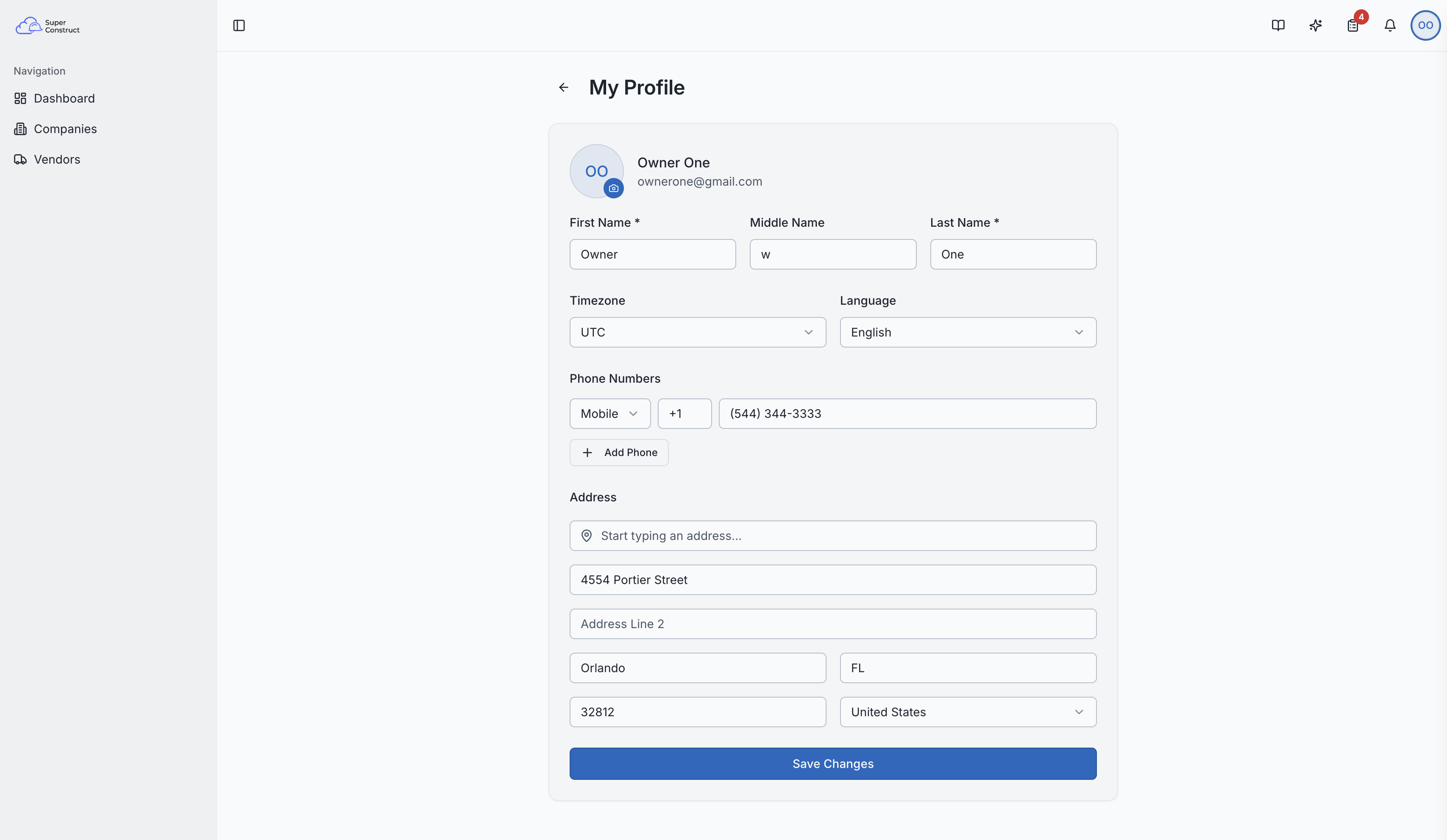
Edit your personal information, preferences, and contact details.
Accessing Your Profile
Click your avatar in the top-right corner of the header, then select "My Profile" from the dropdown menu.
What You Can Edit
Personal Information
- First Name, Middle Name, Last Name
- Profile Picture — upload or change your avatar photo
Preferences
- Language — choose from English, Spanish, French, and more
- Timezone — select your local timezone for accurate time displays
Contact Information
Phone Numbers
You can add multiple phone numbers, each with:
- Type — Mobile, Work, Home, or Fax
- Country Code — international dialing code (e.g., +1, +91)
- Number — your phone number
You can designate one number as your primary contact number.
Address
- Street Address (Line 1 and Line 2)
- City, State, ZIP/Postal Code, Country
- Google Places Autocomplete — start typing an address and select from suggestions to auto-fill all fields
Saving Changes
All changes are saved when you click the save/update button. Your profile information is used across the platform — for example, your name appears on documents, messages, and audit trails.
The profile editing page with personal info and preferences
Roles: Every authenticated user can edit their own profile.